Relationships Tab
The Relationships tab on the Main tab of the Patient Folder allows you to:
-
Add a Caregiver or Agent to a Person in Care profile
-
Manage the Caregiver, Agent and Person in Care relationship
-
Add or update consent information
Select the highlighted areas to learn more about the different sections of the Relationships tab.
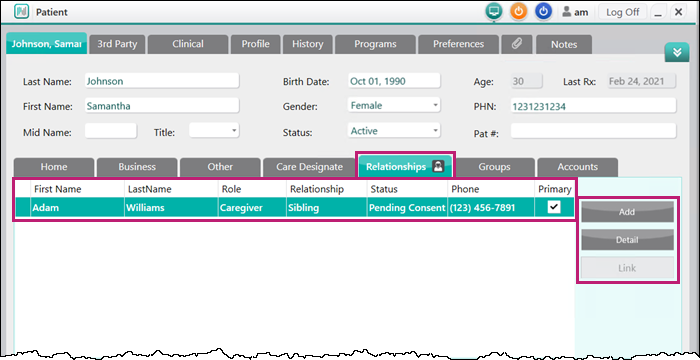
From this tab, patients can be designated as a Caregiver, Agent or Person in Care.
-
Person in Care - a patient that has provided consent and authorized another person to manage and receive notifications of their prescriptions. A Person in Care must be a regular patient at your pharmacy.
-
Caregiver - a person that has been authorized to manage prescriptions and receive notifications for a Person in Care. A Caregiver can be an existing patient at your pharmacy (e.g., has prescriptions filled at your pharmacy) or a customer with a modified Caregiver Patient Folder (e.g., a profile created at your pharmacy, but cannot have prescriptions filled).
Note: A Patient Folder with a Caregiver status does not require as much detail as a regular Patient Folder and no prescription-related activities can be performed. For more information, see Caregiver Patient Folder.
Caregivers have the following abilities:
-
Receive Rexall Reminders for a Person in Care based on the communication preferences set in the Caregiver's Patient Folder.
-
Manage the Person in Care’s prescriptions and receive notifications in the BeWell app, if they are registered on the BeWell app and the account is linked in Nexxsys.
-
-
Agent - a patient that has been allowed to pick up prescriptions on behalf of a Person in Care. An Agent does not have authority to manage prescriptions or receive notifications about a Person in Care.
Theses relationships are added and managed in the Relationships tab of the Person in Care's profile.
For more information, see the topics below: